yum group install "KDE Plasma Workspaces" grubby --update-kernel=ALL --args="video=hyperv_fb:1920x1080" systemctl set-default graphical.target
Pointing ESX to Syslog server
It has been possible for a while to send system logs to a syslog server over the network. In your Linux server edit syslog server to enable listening on port 514 for both UDP and TCP connections. Restart rsyslog and make the following changes to your ESX Cluster using PowerCLI:
Connect-VIServer 192.168.0.10
Get-VMHost | Set-VMHostSysLogServer -SysLogServer 'udp://192.168.0.130:514'
Get-VMHost | Get-VMHostFirewallException -Name syslog | Set-VMHostFirewallException -Enabled:$True
$esxcli = Get-ESXCLI -VMHost 192.168.0.17
$esxcli.system.syslog.reload()
Deleting old ZFS signatures from a disk
If you wish to reuse a disk for ceph it has to be clear of previous filesystem signatures such as ZFS. To clear all the signatures use wipefs:
sudo wipefs --all --force /dev/vdb
VMware Raw Device Map via Command Line
Logon to your ESX host and run the following command to map a physical disk to a rdm file in the folder where you VM is located:
vmkfstools -r /vmfs/devices/disks/naa.XXXXXXXXXXXXXXXXXXXXXXXXX rdm1.vmdk
Edit your VMX file to point to the newly created RDM disk:
scsi0:2.present = "TRUE"
scsi0:2.deviceType = "scsi-hardDisk"
scsi0:2.fileName = "rdm1.vmdk"
scsi0:2.mode = "independent-persistent"
scsi0:2.redo = ""
Setting up Zabbix Agent to monitor CPU and HDD Temperatures
First turn off the firewall and disable selinux:
systemctl disable firewalld vi /etc/selinux/config
Install the Zabbix 3.4 source repo and install zabbix and lm_sensros and smartmontools:
rpm -ivh https://repo.zabbix.com/zabbix/3.4/rhel/7/x86_64/zabbix-release-3.4-2.el7.noarch.rpm
yum install -y zabbix-agent lm_sensors smartmontools
Edit /etc/zabbix/zabbix_agentd.conf and set the Server and ServerActive to the hostname of your zabbix server. Create a sudoers.d file for zabbix in /etc/sudoers.d/zabbix:
zabbix ALL=NOPASSWD:/usr/sbin/smartctl zabbix ALL=NOPASSWD:/bin/sensors
Create a new files in /etc/zabbix/zabbix_agentd.d called hdd_temps.conf and enter information like so:
[Read More]Setting postgresql default database locale
UPDATE pg_database SET datallowconn = TRUE WHERE datname = 'template0';
UPDATE pg_database SET datistemplate = FALSE WHERE datname = 'template1';
drop database template1;
CREATE DATABASE template1 ENCODING = 'utf8' TEMPLATE = template0 LC_CTYPE ='en_US.utf8' LC_COLLATE = 'en_US.utf8';
UPDATE pg_database SET datistemplate = TRUE WHERE datname = 'template1';
UPDATE pg_database SET datallowconn = FALSE WHERE datname = 'template0';`
Setting up mediasmartserverd for Centos 7 on EX490
This post details setting up mediasmartserverd under Centos 7 on an HP EX490. This allows for the status LED to be used as an indicator for updates and also the drive lights to be illuminated according to disk state/activity. The mediasmartserverd binary is built on the local machine:
yum -y install wget zip libudev-devel
yum -y groupinstall "Development Tools"
wget https://github.com/merelin/mediasmartserverd/archive/0.5.6.tar.gz
tar -zxvf 0.5.6.tar.gz
cd mediasmartserverd-0.5.6
make
cp mediasmartserverd /usr/local/sbin/
vi /usr/lib/systemd/system/mediasmartserverd.service
Then enter the following into the file and exit with [Esc]:wq:
Accessing DrayTek 130 Modem Status Page via USG
This is more of a note for me but may be useful for some. How to connect to the DrayTek status page from your internal network. First bring up the USG UI and enter in a new static route: 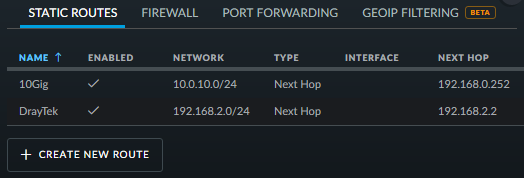 Then login to your USG via SSH and run:
 configure set interfaces ethernet eth3 address 192.168.2.100/24 commit This sets an IP address for the port that the modem is connected to. Then from the USG, login to the draytek - telnet 192.168.2.1 and run: ip route add 192.168.0.0 255.255.255.0 192.168.2.2 3 static You then should be able to browse to https://192.168.2.1/ and login to your DrayTek 130 Modem: 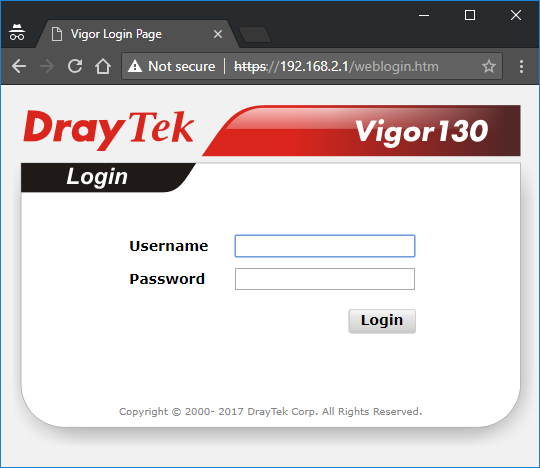
FTTPoD available in Southampton but who from?
I used the BT line checker and got the magically line FTTPoD showing as enabled for my cabinet. However I can’t find anyone who will supply me with this service: 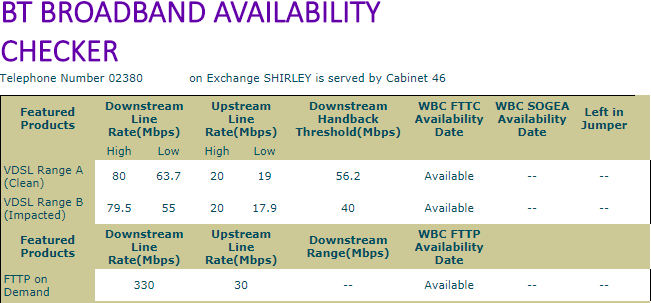 Maybe I will just have to wait for Infinity 3/4 to be available - I wonder how long that takes.
Getting Subsonic working behind Nginx
The subsonic Web UI uses frames as if you just proxy subsonic with SSL/TLS termination like you would with any other website you will find the pages does not load. You need to add a directive to your configuration: add_header X-Frame-Options SAMEORIGIN; This should also work with madsonic.